Brand Protection
 SEM Insights
 Affiliate Compliance
 Ad Armor
 AI Search Insights
 Content Monitoring
 Learning Center
 Guides & Webinars
 We Love Data™
 About Us
 Our Data
 Careers
 Our Team
 News
News Contact Us
What Is Brand Bidding? How to Tell if Affiliates Are Doing It
What is Brand Bidding?
Brand bidding is a paid search strategy where advertisers bid on a competitor’s or partner’s brand name as a keyword to appear in search results. This practice is commonly seen in PPC campaigns and affiliate marketing.The purpose is to redirect traffic from a competitor’s site by appearing in search results when that brand is searched.
- Goal and Purpose: The primary goals of brand bidding include capturing high-intent traffic, protecting and increasing visibility against competitors, and, in some contexts, increasing the conversion rate by targeting users further along the buying process.
- Legality and Risks: Engaging in brand bidding may carry legal risks, especially if it’s deemed trademark infringement. The legal permissibility can vary and usually hinges on criteria set by legal authorities like the European Court.
- Impact on Advertising Costs: Bidding on branded keywords often leads to an increase in bid prices due to heightened competition. This can raise the overall costs associated with search engine marketing campaigns.
- For example, you could bid on “Nike shoes” if you’re an Adidas reseller or on your own brand to protect your search position from affiliates or competitors.
- Additional Potential Examples: Bidding on “Apple Watch” if you’re a third-party retailer selling refurbished smartwatches — to capture traffic from users intending to purchase directly from Apple.
- Additional Potential Examples: Bidding on “Delta flights” if you’re a travel aggregator like Expedia — to draw clicks from travelers searching for direct airline bookings.
Brand Bidding – Match Type
Yes, your affiliates are your marketing partners. However, they will bend your program rules if it makes an extra buck. In addition, it can be tricky to know if an affiliate is bidding on purpose or by accident. This gray area occurs because an ad can appear on a search engine results page (SERP) due to match type and a feature called ‘auto-apply recommendations. Match type is a designation the advertiser assigns when creating the ad—in this case, the advertiser is your affiliate. There are three match types available for targeting your ad at user searches, as well as a fourth for blocking your ad from showing for specific searches:
- Exact Match: The ad appears only if the user requests the same keyword or a very close synonym in the search query. Example: If you select the exact match keyword [kitchen cabinets], your ad will show for ‘kitchen cabinets’ or ‘kitchen cupboard,’ but not ‘bathroom cabinet.’
- Phrase Match: The ad appears if the user searches for a keyword containing the targeted phrase or a synonym. Example: If you select the phrase match keyword “women’s pants”, your ad will show “women’s pants,” “where to buy pants for women,” “women’s slacks for sale,” and “women’s jeans,” but not “dresses for sale.”
- Broad Match: The ad appears if the user searches for a keyword that contains the targeted phrase or a related term. Example: If you select the broad match keyword “auto repair,” your ad will show “auto repair,” “mechanic shop,” “car products,” and “Tesla Model Y,” but not “home repair.”
- Negative Match: The ad will not appear if specific terms designated by the advertiser are present in the search query.
Brand Bidding – Challenges
- Increased Competition and Bidding Wars
- Rising Cost-Per-Click (CPC)
- Mitigation: Combine strict affiliate agreements with always‑on monitoring to control CPC inflation from affiliate brand bidding.
- Traffic Diversion and Reduced Visibility
- Affiliate brand bidding diverts high‑intent, branded traffic and cannibalizes conversions you would likely win at a lower cost.
- Customer Confusion and Brand Dilution
- Brand dilution risk: Affiliates using your name in ad copy can introduce inconsistent or misleading messaging that harms trust and reputation.
- Legal Risks and Compliance Issues
- Detection and Attribution Difficulties
Affiliate brand bidding increases CPCs on your own branded campaigns and lowers return on ad spend by forcing you into bidding wars for traffic you would have captured organically.
Benchmarks to Spot Issues
Use benchmark ranges as a quick diagnostic layer to identify potential brand bidding activity before diving into deeper analysis.
CTR (Click-Through Rate) signals
- Typical paid search CTR: ~3% to 7%
- Branded terms often perform above this range due to high intent
- Potential red flag:
- Branded CTR drops below your normal baseline
- Sudden decline without changes to ad copy, budget, or rankings
CPC (Cost-Per-Click) signals
- General search average CPC: ~$5 range (varies widely by industry)
- Branded CPC should typically be stable and lower than non-brand
- Potential red flag:
- Branded CPC increases sharply without internal changes
- Rising CPC paired with declining CTR or position
How to validate anomalies
- Compare against your last 30 to 90 days of performance
- Segment by:
- Device (mobile vs. desktop)
- Geography (regions where affiliates may be active)
- Query type (pure brand vs. brand-plus terms)
- Cross-check with Auction Insights to identify new or more aggressive bidders
Brand Bidding – Mitigation Strategies
- Negative Keywords
- Trademark Complaints
- Diagnostic Tools
- 24/7 monitoring: Continuously track branded keywords across Google, Microsoft, and other engines, geographies, and devices to catch violations missed by manual checks. Our crawlers simulate real users and capture live SERPs and landing pages across regions and devices in real time.
- Evidence collection: Automatically store ad and landing page screenshots, partner links, and full redirect chains for airtight enforcement.
- Affiliate Agreements
- Real-Time Monitoring
- Instant violation alerts: Get real‑time notifications with screenshots when brand bidding is detected so you can take immediate action.
Test Around Evasion
Sophisticated affiliates and competitors often use dayparting and geo-targeting tactics to avoid detection, only bidding on your brand during off-hours, in specific regions, or outside your primary monitoring locations.
To uncover this activity, expand your testing approach:
- Run checks during off-hours (early morning, late night, weekends)
- Rotate through multiple geographic locations using VPNs or proxy tools
- Compare SERPs across:
- Key markets vs. secondary regions
- High-priority vs. low-priority geos
- Test across devices (mobile vs. desktop), where bidding strategies may differ
These tactics help expose activity that won’t appear in standard, single-location checks. Platforms like The Search Monitor automate this process by continuously monitoring across locations, devices, and time intervals, ensuring evasive brand bidding doesn’t go undetected.
Affiliate Anomaly Alerts
Use these signals to quickly flag affiliates that may be engaging in brand bidding or traffic laundering.
Traffic spikes
- Sudden increase in affiliate-driven sessions without a corresponding campaign change
- Disproportionate growth in branded traffic attributed to a single partner
- Spikes concentrated in:
- Specific geographies
- Short time windows (e.g., overnight or weekend surges)
Conversion rate outliers
- Affiliate conversion rate significantly higher than program average
- Example: 2x to 3x higher than baseline
- High conversion rates paired with:
- Low time on site
- Minimal page depth
- Indicates potential interception of high-intent branded users
Referrer and attribution gaps
- Sessions with blank or “direct” referrers tied to affiliate activity
- Inconsistent or missing UTM parameters
- Traffic appearing as:
- Direct → then attributed to affiliate at conversion
- May signal cookie stuffing, redirects, or attribution hijacking
Query and intent mismatches
- Affiliate traffic heavily skewed toward:
- Pure brand terms
- “Brand + coupon / discount / promo” queries
- Misalignment between:
- Affiliate’s content strategy
- Actual traffic intent
Brand Bidding – Compliance Guidelines
Comprehensive guidelines to ensure legal and ethical brand bidding, including bidding only on registered trademarks and maintaining transparency to prevent misleading ads.
- Registered Trademarks Only: Bid exclusively on marks you own or have explicit permission to use. Google Ads permits trademarked terms as keywords but restricts their use in ad copy when a valid trademark complaint is filed.
- Negative Keyword Lists: Maintain shared negative-keyword lists at the account, campaign, or ad-group level to block non-branded and irrelevant queries (broad, phrase, and exact match) from triggering your ads.
- Disable Auto-Apply Recommendations: Turn off automatic keyword suggestions in the Recommendations page to prevent Google from injecting unapproved brand terms into your campaigns.
- Exact Match for Branded Terms: Limit your branded keyword bids to exact match (or phrase match with strict negative exclusions) to reduce unwanted impressions and ensure tight control over which searches trigger your ads.
- Segment Branded Campaigns: House all branded keywords in their campaigns or ad groups, with dedicated budgets and reporting, to simplify monitoring and prevent budget bleed across non-brand initiatives.
- Set Bid Caps on Brand Terms: In your campaign’s bidding settings, configure maximum CPC bid limits to limit how much you’re willing to pay for each click on high-value branded queries.
- Apply Device & Location Bid Modifiers: Adjust bids by device type (desktop, mobile, tablet) and geographic area to prevent overpaying in underperforming segments.
- Restrict User Access & Permissions: In Google Ads’ Access & Security settings, you can limit who can create or edit your branded campaigns by assigning the minimum necessary access levels (e.g., Read-Only or Standard)
- Monitor Auction Insights: Review Auction Insights for your branded campaigns to detect any new or aggressive bidders on your brand terms, and adjust negatives or bids in response.
- Leverage Third-Party Monitoring Tools: Augment native controls with real-time alerts and compliance reports from platforms like The Search Monitor to catch unauthorized bidding by affiliates or competitors.
- Require pre‑approval for any use of your trademark in ad copy and landing pages: revoke commissions for violations.
Auto-Apply Recommendations
Auto-apply recommendations are a feature provided by both Google and Microsoft Ads which allows the search engine to automatically apply a variety of changes to your ad campaigns, including adding new keywords, without any further permission from the advertiser once an option has been selected.
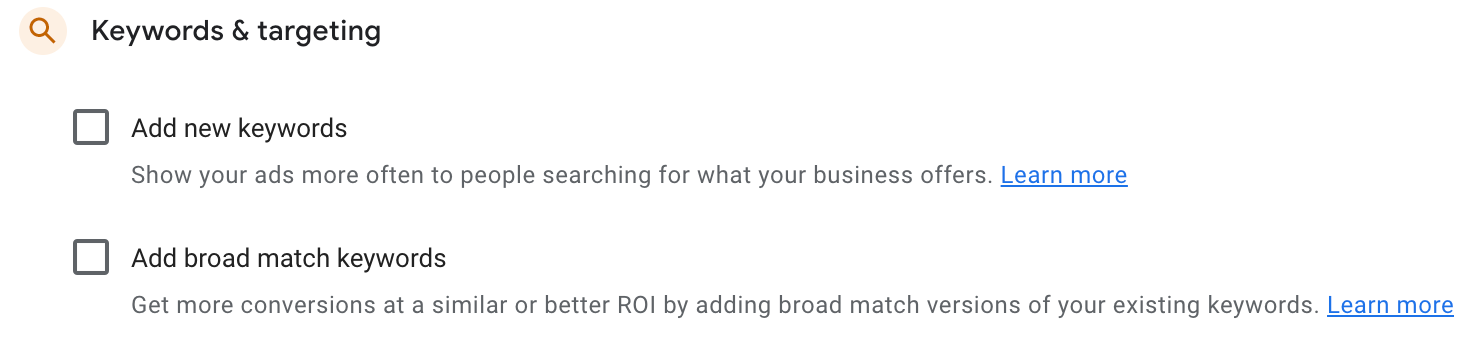
The ad platform selects automatically applied keywords from various places, including ad copy text, display URLs, landing page headlines and copy, related terms, and typos. In other words, Google and Microsoft Ads can show ads on keywords that your affiliate did not intend to sponsor by auto-applying new keywords.
Unfortunately, a searcher cannot control the match-type trigger for paid ads. Instead, the search engine governs this. This means that when you search for your brand and an affiliate’s ad shows up, you can’t tell whether the ad is being shown because they’re targeting your brand keyword or because they’ve selected broad match keywords (or had one auto-applied) which Google is matching against your brand keyword.
Affiliate Brand Bidding – How to Identify
Detecting affiliate brand bidding is crucial to protect your marketing budget and maintain control of your brand’s presence on search results. Watch for affiliates appearing on exact brand and brand+product queries—these are closest to conversion and most prone to cannibalization.
Why it matters: Undetected brand bidding diverts budget, inflates CPCs, and reduces ROI on your branded campaigns.
Marketers must look for other evidence to determine whether brand bidding has intentionally occurred. Ways to do so include:
- Your Brand is the Keyword. First, look to see if there are any instances where the affiliate’s ads appear for searches for just your brand name, including typos and variations with and without the “.com” extension. In addition, look to see if this is happening with your brand-plus terms (e.g. brand + product name, brand + “review,” brand + “sale”, and so on). If the affiliate’s ad shows up for a variety of these different searches, then you can be more confident that they are intentionally bidding on your brand keywords.
- Your Brand Appears in Redirects & Landing URLs. Review all URLs that lead to the landing page, including the display URL, the destination URL, all redirects, and the final landing page URL. If your website URL or brand name appears in any of these URLs, then it is very likely that the affiliate is bidding on your brand terms.
- Look for Keyword Tagging. Affiliates often embed either the keyword or the category of the keyword (e.g. ad group) into a tracking parameter in the URL string to track the source of the traffic. Keyword tracking parameters can either be dynamic (inserted by the search engine using a variable) or fixed (inserted by the affiliate at the time of ad creation). For example, Google uses the tag {keyword} to show the sponsored keyword (not the search query) that triggered the ad.
- Look for Bold Text in the Ad. Ad text appears bolded when that exact text is included in both the search phrase and the ad. Therefore, look for the non-brand part of the search term. If there is ad text that matches the non-brand portion of the search phrase and it is not in bold, then the affiliate’s ad matches your brand keyword.
- Look For Your Brand in Ad Copy. If your brand is included in the ad copy, the affiliate likely intended their ad to appear for searches of your brand name.
- Monitor the Phrase Without Your Brand. Remove your brand from the phrase and see if the affiliate shows up with the identical ad copy on the non-branded version. You can be sure the brand was the intended target if the answer is no. If the answer is yes, then you will need to do more to determine if the affiliate is bidding on your brand and related generic terms.
- Traffic source analysis: Correlate affiliate conversions with paid search parameters (gclid/msclkid, utm_term, keyword/adgroup IDs) to identify sales from branded keyword clicks.
Determining the likelihood of the affiliate’s intention to brand bid is essential in effectively managing your brand. Broad match, phrase match, and auto-applied keywords can muddy this process. But by following the steps above, you can determine with a reasonable degree of confidence whether an affiliate is acting in bad faith or if they are, at worst, inadvertently and unintentionally bidding on your branded terms.
Paid vs. Organic Signal Check
Compare paid and organic performance to uncover hidden brand bidding activity.
Why it matters
- Branded search intent is typically stable
- New bidders can pull clicks from both paid and organic listings
1. Establish a baseline
- Pull:
- Google Ads CTR for core brand terms
- Search Console CTR for the same queries
- Use a 30 to 90 day window to define normal performance
2. Look for key signals
- Paid CTR drops unexpectedly
- Organic CTR also declines
- Impressions remain steady
→ Likely indicates new competition in the SERP
3. Stronger confirmation
- Paid CTR ↓ + CPC ↑ or position worsens
- Organic CTR ↓ despite stable rankings
→ Suggests active brand bidding (affiliate or competitor)
4. Validate
- Check Auction Insights for new or rising bidders
- Review brand + modifier queries (e.g., “brand + coupon”)
- Segment by device and geography
Key takeaway
- If both paid and organic CTR decline without changes to demand or rankings, it’s a strong signal that someone else is bidding on your brand
FAQs
Is Brand Bidding Legal?
Brand bidding can be legal, but its legality depends on factors like trademark laws, search engine policies, and specific agreements between advertisers and affiliates. Many companies prohibit unauthorized brand bidding in their affiliate programs to protect their brand reputation. However, it’s not typically illegal unless it violates trademark rights or contractual terms.
Can a Competitor Use my Brand Name in their Ad?
Competitors can sometimes use your brand name in their ad, depending on the platform and local laws. For example:
- Google Ads Policy: Competitors can bid on your brand name as a keyword, but they generally cannot use your trademarked name in their ad copy unless they are authorized or resellers of your product.
- Trademark Rules: If your brand name is trademarked, you can file a complaint to prevent unauthorized use of it in ad copy. However, this doesn’t always stop them from bidding on your brand name as a keyword.
It’s important to review search engine policies and take legal action if needed.
Can I stop Competitors from Bidding on my Brand?
Yes, you can take steps to stop competitors from bidding on your brand in paid search ads. Here are some common actions:
- Trademark Complaints: File a trademark complaint with search engines like Google or Bing, which may prevent others from using your trademarked terms in their ad copy.
- Affiliate Agreements: Ensure your affiliate agreements explicitly forbid brand bidding and monitor for violations.
- Monitoring & Reporting: Use monitoring tools to detect brand bidding and report unauthorized activity to the search engine or the competitor directly.
However, while search engines may restrict ad copy, they often allow competitors to bid on trademarked terms in keyword targeting.
How does The Search Monitor detect unauthorized brand bidding across affiliate networks?
The platform’s SmartCrawler™ engines mimic real users across desktop, mobile, and diverse geographies to fetch live SERPs and landing-page experiences. They automatically flag any ad units or URLs that contain your trademarked terms, typos, or unauthorized redirects.
It cross-references every detected keyword and ad copy snippet against your registered trademark list to spot brand bidders, URL hijackers, and improper affiliate messaging in real time
Combined with Similarweb’s advanced digital-intelligence layer, these scans trigger automated alerts and enforcement workflows the moment a violation appears, ensuring no unauthorized brand bids slip through.
What data types and metrics does The Search Monitor report on to analyze brand bidding trends?
- Share of Voice (SOV) and impression share for each branded keyword enable you to quantify the auction volume competitors and affiliates are capturing versus you.
- Average position and rank history for your brand terms, so you can spot bidding-war spikes or position losses over time.
- Violation counts by type (e.g., URL hijacking, ad copy abuse, unauthorized brand bidding), breakdowns by affiliate partner and geography.
- Ad copy and landing-page snapshots are exportable via API or FTP for forensic analysis of messaging, offers, and redirect behavior.
- Custom dashboards and trend charts that correlate your spend/ROI against competitor threats, so you can make data-driven decisions on bids and budgets.
Can The Search Monitor differentiate between intentional and accidental brand bidding by analyzing match types and auto-apply keywords?
The platform flags every instance of your brand terms—regardless of match type—in both the search query and the targeted keywords, then correlates that with landing-page URL parameters (e.g., tracking tags, redirect domains) to reveal whether an affiliate deliberately targeted your brand or merely triggered via broad-match or auto-apply features.
By surfacing patterns—such as repeated hits on exact-match brand queries, bolded ad text mismatches, or brand flags in tracking parameters—you can reliably infer intent and prioritize enforcement actions accordingly.
How can marketers leverage The Search Monitor’s real-time alerts to take swift action against unauthorized brand bidding?
Instant email alerts notify you when a new brand-bidding violation is detected, with screenshots of the ad and landing page, so you can immediately dispatch trademark complaints or update negative-keyword lists.
Built-in enforcement workflows let you send templated notices to offending affiliates or trigger platform takedown requests in minutes rather than hours or days, dramatically reducing unauthorized spending and click theft. One‑click export of evidence packages accelerates complaints and affiliate clawbacks.
What integrations does The Search Monitor offer for seamless monitoring of brand bidding in Google Ads and other PPC platforms?
Multi-engine support across Google Ads, Microsoft Ads, Yahoo, Amazon Ads, Baidu, Yandex, and more, — so you can manage all brand-bidding compliance from one dashboard.
API and FTP exports that feed raw ad-scan data, violation reports, and SOV metrics directly into your BI tools or internal compliance systems.
Single sign-on (SSO) and role-based permissions, ensuring only authorized team members can view or act on sensitive compliance insights.
What CTR should we expect on branded keywords, and when does a drop indicate trademark bidding?
Typical branded paid CTRs often range 3–7% in aggregate, though some brands see much higher on core terms. Monitor your historic baselines by position; an unexplained decline, especially while position remains stable, can indicate new trademark bidders siphoning clicks.
How do we use CPC trends to detect trademark bidding on our brand?
Track CPC for core brand terms vs. brand-plus terms. After controlling for major ad platform changes, a material CPC rise (e.g., 10%+ week over week) alongside new auction participants suggests competitive pressure from trademark bidders or affiliates.
Can organic branded CTR drops also signal brand bidding problems?
Yes. Compare Google Search Console CTR for core branded queries against historic norms. If organic CTR declines while the SERP shows more paid brand ads from partners/competitors, trademark bidding is likely displacing organic clicks.
What partner behaviors commonly indicate affiliate brand bidding or traffic laundering?
Watch for sudden traffic spikes from an affiliate, unusually high conversion rates relative to program averages, and frequent blank referrers. These patterns often accompany brand bidding or ad hijacking and warrant investigation.
How do infringers avoid manual detection and how can we test around it?
They often exclude employee locations and run ads off-hours. Validate with off-hours checks, testing from varied cities/countries (VPN or remote nodes), and rotating devices. Automated monitoring with broad geo/daypart coverage closes these gaps.
Share on Social
See Our Brand Bidding Data at Work
Provide us with a competitor’s website, a set of keywords, or one of our 1,000+ verticals, and we’ll show you the power of our monitoring capabilities. Request a personalized demo today and see what our insights can do for you!
Trusted by